Part of your application form asks the applicant to name the suppliers it already buys from on credit. Those are its trade references, and they are often the most useful thing in a credit file: they say how much the applicant really owes, whether it pays on time, and whether anyone has to chase it. You do not contact them yourself. Credlab does, as part of the research on the report you order, and puts what they say into your report. This article explains where the references appear for you, what the supplier on the other end receives, and how to answer a supplier who phones you asking what the request is.
Before you start
- There is nothing to set up. Every application that comes in through your link carries whatever references the applicant typed in.
- How many reference blocks your form shows, and which fields on them are required, is a setting on your form. See "Set up references, locations and contacts on your form".
- Reference work happens as part of a report. If nobody has ordered on a file, nobody is contacting its references. See "Order a business credit report".
- You cannot send, chase, or add a reference request yourself. Use Questions? on the file to ask Credlab to do any of it.
Where the references come from
- The applicant works through your form and reaches the Company References step. The note at the top of the step tells them plainly what the references are for: Credlab will contact them to verify the applicant's credit history.
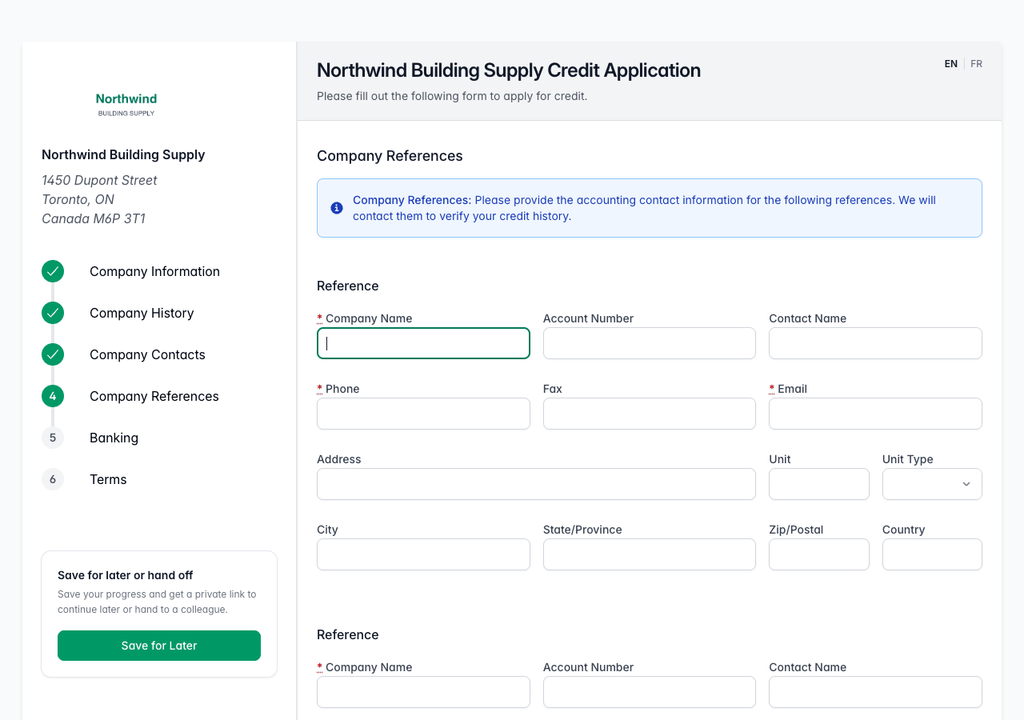
The Company References step of the Northwind Building Supply application form, with a blue note reading Company References: Please provide the accounting contact information for the following references, above the first reference block where Company Name, Phone and Email are marked as required. - The applicant fills in a block per supplier: company name, the account number it trades under, a contact name, phone, fax, email, and address. Fields marked with a red asterisk have to be completed before the form will move on. The rest are optional.
- The applicant clicks Additional Reference if it has more suppliers than your form offers blocks for.
- The applicant submits the form and the references arrive on the file with the rest of the application.
The two fields that decide whether a request actually gets answered are the Email address and the Account Number. The request is emailed to the address the applicant gave, so a wrong address means nothing arrives. The account number is printed on the request so the supplier can find the applicant in its own ledger without having to guess which of its customers is being asked about.
Where you see them on your file
The references are part of the submitted application, so you read them the same way you read anything else the applicant typed.
- Open the credit file. If you are not sure where it is, see "Find and open a credit file".
- Click Application in the Reports/Documents card. The submitted application opens in a preview window over the file. Scroll down to Company References.
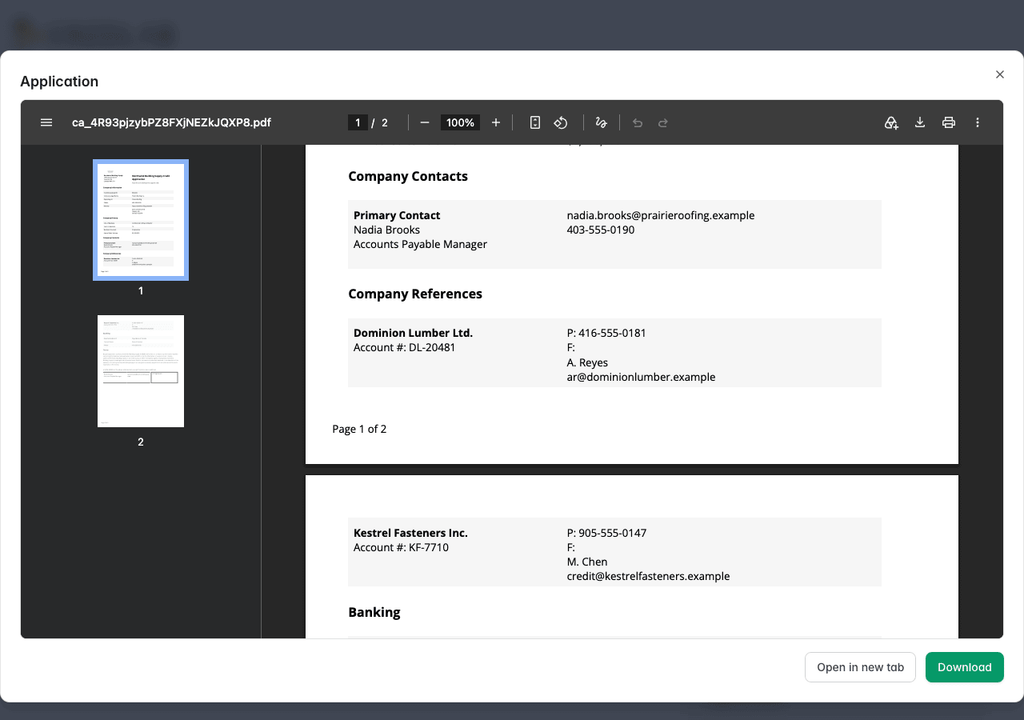
The submitted application for Prairie Roofing Co. open in a preview window over the credit file, scrolled to the Company References section listing Dominion Lumber Ltd. with account number DL-20481 and Kestrel Fasteners Inc. with account number KF-7710, each with a phone number, a contact name and an email address. - Click Download to keep a copy, or Open in new tab to read it full size.
What the suppliers actually said comes back later, in the Credlab report on the file. The report has a Trade References section with one panel per reference. Each panel repeats the supplier's name, account number, address and contact details, and once Credlab has the supplier's answer on the file it also carries the figures they gave: who was spoken to and their title, the credit limit, the highest credit ever granted, the current amount owing, the terms, the amounts 30, 60 and 90 days past due, how quickly the applicant usually pays, whether there have been other inquiries about it, whether there have ever been NSF cheques or reminder calls, how long the account has been open, the date of the last sale, and any comments. Reading the report is covered in "Read your Credlab report".
Between submission and the finished report there is no per reference progress for you to watch. If you need to know where a particular reference has got to, ask on the file with Questions?.
What your applicant's supplier receives
Understanding this part is mostly about being able to answer the phone when a supplier rings you instead of Credlab.
- The supplier gets an email from Credlab with the subject "Trade Reference Request on" and your applicant's name. It opens "Dear Credit Manager", says that their client has asked Credlab to contact them for a credit reference, and asks for their help filling in a short online form.
- The email carries a link to the form and, printed separately underneath it in large type, the same five character code. Either one gets them in, so a supplier whose email program strips links is not stuck.
- The supplier clicks the link and the form opens straight away. No password, no account, nothing to install.
- Or the supplier goes to the lookup page themselves and types the code into the five boxes, one character per box, then clicks Submit.
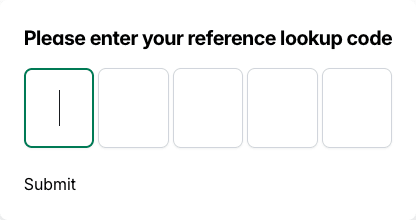
The reference lookup page showing the heading Please enter your reference lookup code above five single character boxes and a Submit button. - Either route lands on the same form. It names the supplier at the top left, your applicant at the top right with the account number the applicant gave, and a request number. Underneath is one screen of questions about how the applicant pays, and a Submit button.
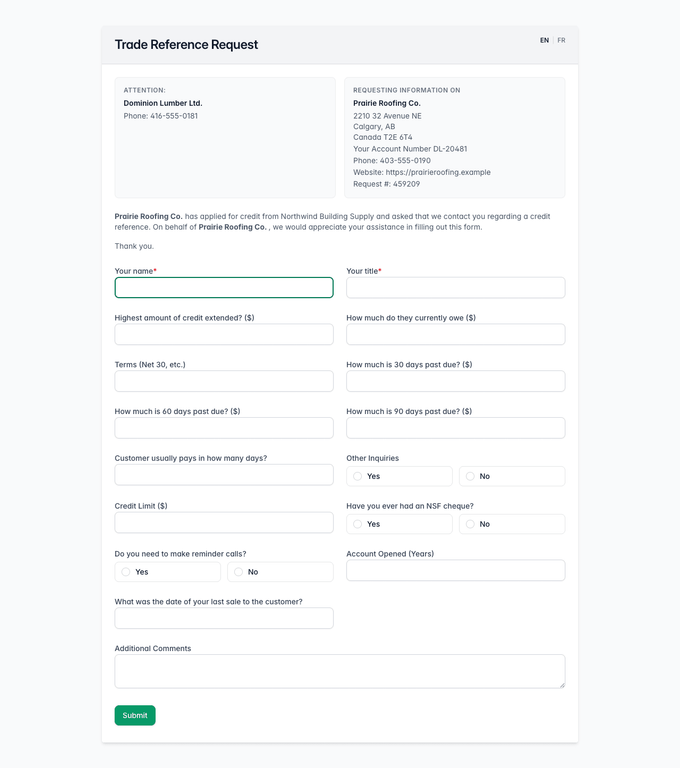
The Trade Reference Request form addressed to Dominion Lumber Ltd., requesting payment details on Prairie Roofing Co. under account number DL-20481 and request number 459209. - The supplier fills in what they are willing to share. Only the name and title of the person answering are required, so a supplier who will give you payment terms but not a dollar figure can still send something useful.
- The supplier clicks Submit and lands on a thank you page. The answers go straight onto the file.
Codes are five characters long and are built from a deliberately narrow alphabet: no zero, O, one, I, five, S, eight or B, so nothing can be read back wrongly over the phone.
If the supplier cannot use the online form
Some suppliers will not fill in a web form, and some only deal in fax. For those, Credlab sends the same set of questions as a fillable PDF, either by fax or attached to an email. It can be completed on screen in any PDF reader, or printed and filled in by hand. It carries the same short code as the online form, and a request number made of the file number plus a suffix for that reference (for example 459209-1), while the online form shows the file number alone. The footer tells the supplier how to return it: fax it back on the toll free number printed there, or email a copy to service@credlab.com. A supplier who starts on paper and then changes their mind can still type the code into the lookup page and answer online instead, as long as the request has not already been answered.
The two week window, and one answer per reference
A reference code is live for two weeks. After that it stops working, and a supplier who tries it is told the code could not be found. This is deliberate: a link that stays open indefinitely is a link that can be forwarded anywhere. If a supplier comes back to you after the two weeks are up, ask Credlab through Questions? for a new request rather than sending them the old code again.
Each reference can be answered once. As soon as a supplier submits the form, the code closes, and anyone who tries it again, including the same person on a second device, is told that a reference has already been received from that request. If a supplier tells you they answered and then realised they had a figure wrong, do not send them back to the link. Use Questions? on the file and tell Credlab what needs correcting.
Whose name the request goes out in
The request can go out in your company's name or in Credlab's alone. It is a single setting on your Credlab account, and an account admin can change it.
When it is on, the request email is signed with your company name followed by CREDLAB, and the online form says that the applicant has applied for credit from you specifically. When it is off, the email is signed CREDLAB only and the form says the applicant has applied for credit, without naming you.
Most credit teams leave it on. Naming you makes the request easier for a supplier to place, and a supplier who is unsure can ring you to check. Turning it off is for the cases where you would rather your interest in a company was not visible to that company's other suppliers.
Trade references and reported trades are not the same thing
Your report can carry two sorts of trade information, and they come from different places.
Trade References are the suppliers your applicant named on your form. They are specific to this application, and what appears there is what those suppliers told Credlab when they were contacted.
On File Trade Data is trade information Credlab already holds on the applicant from its own files, contributed by other credit grantors rather than chosen by the applicant. It appears in the report as a summary over 90 days, 13 months and all references combined, with a table of the individual lines underneath.
The difference matters when you read a report. Trade references are chosen by the applicant, so any applicant with a choice will name suppliers it pays well. On file trade data is not chosen by anybody, so it is the better guide to how the applicant pays the suppliers it did not name. A file with strong references and thin on file data is not the same risk as one where both agree.
Tips & notes
- A supplier asking whether the request is genuine. Tell them yes, and that Credlab sends it on your behalf because your applicant named them as a reference. The terms your applicant agreed to on your form authorise you, and any agency working for you, to investigate the references listed on it. The safest thing they can do is ignore the link, go to the Credlab reference lookup page themselves, and type the five character code from the email. Point out what the form does not ask for: no banking details, no passwords, no login, nothing about their own company's credit. It asks only how your applicant pays them. If they still want to check, the request email carries Credlab's own phone number and the address service@credlab.com.
- A reference who has not replied. Use Questions? on the file. Tell Credlab which reference and it can send the request again, try the fax, or phone them.
- A reference the applicant left off. Same route. Send the supplier's name, contact and email through Questions? on the file and Credlab can add it and request it.
- The form is bilingual. The reference form carries an EN and FR switch in the top right, and requests can be issued in either language, so a Quebec supplier is not stuck reading English.
- A reference with no email address. The request cannot be emailed, and the file waits. If you can find the right accounts receivable address yourself, pass it to Credlab through Questions? rather than waiting for the applicant to correct it.
- Quote the short code or the file number. The short code is unique to that request and is the quickest way for Credlab to find it. The file number works too, but on the PDF it carries an extra suffix for that reference (for example 459209-1), so read it back exactly as the supplier has it in front of them.
Related articles
- Read your Credlab report
- Order a business credit report
- Set up references, locations and contacts on your form